
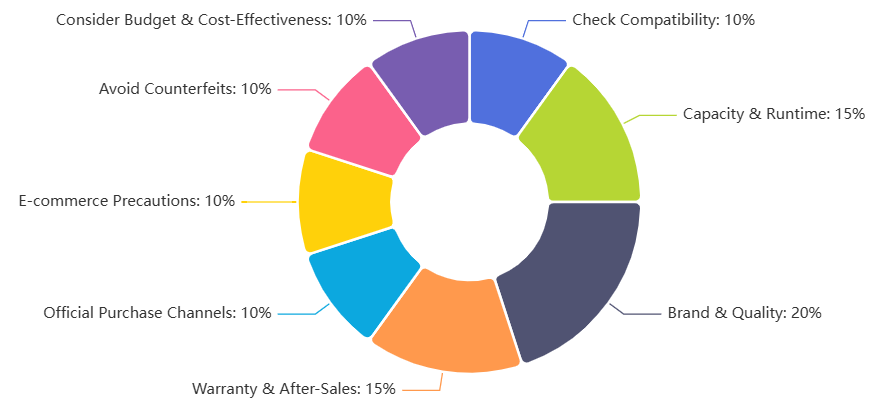
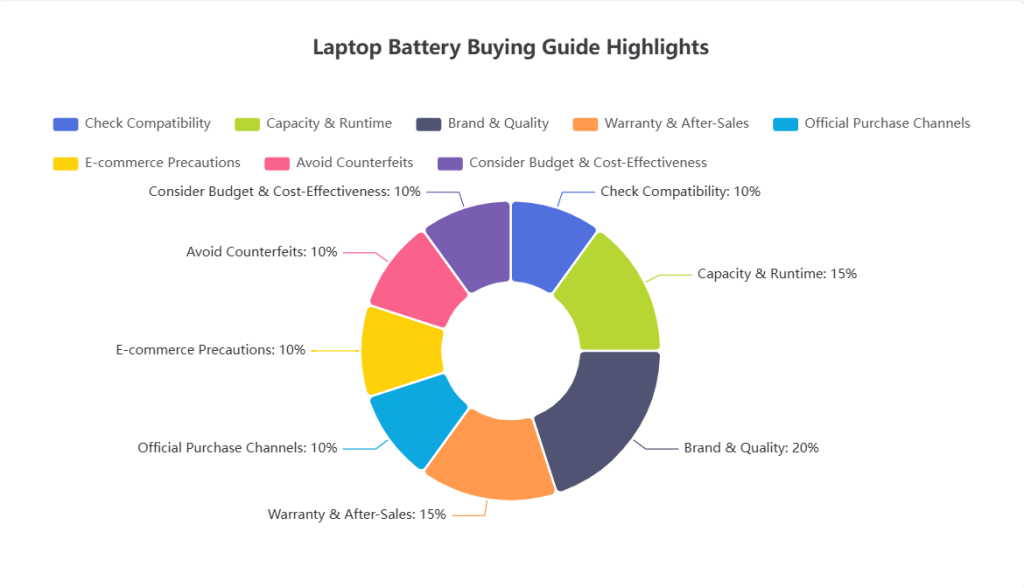
Laptop Battery Buying Guide
💡 Laptop Battery Buying Rhyme
When buying a battery, don’t rush,
Check compatibility, no need to fuss.
Higher capacity lasts much longer,
Voltage and connectors must be stronger.Brand reputation is the key,
Original quality brings safety, you see.
Check the cycle count for its lifespan,
Certification marks give peace of mind, man.Official stores are the safest bet,
Online shops need reviews to vet.
Counterfeits are light and cheap in hand,
Genuine ones feel solid and stand.In short, choose the right one true,
Your laptop’s battery life will thank you too!
Introduction
In modern mobile work, study, and entertainment, laptops have become indispensable tools. Among all the hardware components, the battery is one of the most critical parts. It not only determines a laptop’s battery life but also affects its safety and usability. Choosing a high-quality battery that meets your specific needs is an essential step for every user.
This guide provides a comprehensive overview of laptop battery selection, covering battery types, purchasing principles, performance testing, and buying channels.
Basic Types of Laptop Batteries
1. Lithium-Ion Battery (Li-ion)
Lithium-ion batteries are the most common type of laptop battery today. They offer high energy density, no memory effect, and lightweight design, making them suitable for a wide range of laptop models.
2. Lithium-Polymer Battery (Li-Polymer)
Lithium-polymer batteries are thinner and lighter than Li-ion batteries and can be designed in various shapes. They are often used in ultrabooks. Although slightly more expensive, they provide better safety and stability.
3. Nickel-Metal Hydride (NiMH) and Nickel-Cadmium (NiCd) Batteries
These are older battery types, with lower capacity, shorter lifespan, and memory effects. They are now mostly obsolete, but understanding their characteristics helps to appreciate the advantages of modern batteries.
General Principles for Selecting Laptop Batteries
When choosing a laptop battery, in addition to the battery type, pay close attention to capacity, battery life, quality, and warranty policies.
1. Battery Capacity and Runtime
- Typical laptop battery capacity ranges from 3000–4500mAh, with some high-end models reaching 6000mAh.
- Higher capacity generally means longer battery life under the same usage conditions.
- It is recommended that the battery supports at least 3 hours of continuous use for daily mobile work.
2. Battery Quality and Safety
Battery quality directly affects user safety. Many global brands have recalled batteries due to defects:
- Dell once recalled 27,000 batteries due to short-circuit risks causing fire hazards.
- Compaq also recalled around 55,000 battery units for similar issues.
Consumers should prioritize brand reputation and safety certifications, such as CE, FCC, and RoHS, when purchasing batteries.
3. Battery Warranty and After-Sales Service
Laptop batteries typically have the shortest warranty among components, often 3–6 months, with some not covered at all. Batteries with a one-year warranty are rare. Always check the manufacturer’s warranty policy and ensure it is clearly stated in the purchase contract.
Detailed Guidelines for Battery Selection
1. Checking New Batteries
For a brand-new laptop, the battery should be unused. New batteries typically contain 5%–10% “float charge”. If the system shows low battery during initial setup, it is normal and indicates the battery is truly new. Make sure the purchase contract specifies the battery warranty terms.
2. Key Points for Purchasing Spare Batteries
Spare batteries are relatively expensive, usually 10%–15% of the laptop price. Consider the following to assess authenticity and quality:
- Appearance and Weight: Original batteries have a fine finish, clear labeling, and are slightly heavier. Counterfeit or assembled batteries may have rough casing, unclear fonts, or loose fit.
- Identifying Used Batteries: Worn electrodes, dull casing, scratches, or discoloration are signs of second-hand batteries. Beware of batteries that look “new” but are unusually cheap.
- Weight Differences: Original batteries often include protective circuits and high-quality cells, making them heavier than assembled or low-quality batteries.
3. Battery Performance Testing
The core performance metric for laptop batteries is runtime. The Japan Electronics and Information Technology Industries Association (JEITA) provides standard testing methods in the “JEITA Battery Life Measurement Method (Ver1.0)”:
- Method A: Continuous playback of an MPEG1 file from the hard drive at minimum volume, screen brightness above 20cd, resolution 320×240, to measure continuous usage time.
- Method B: Pure standby test with no programs running, LCD/backlight on at minimum visible brightness, to measure standby time.
The average of these two methods is used as a reference. If practical testing closely matches the manufacturer’s claimed values, the battery is considered reliable.
4. Choosing Second-Hand Batteries
For budget-conscious users, second-hand batteries must be chosen with caution. Check the label clarity, electrode wear, and perform necessary performance tests. While cheaper, second-hand batteries carry higher risks. Unless on a tight budget, buying a new battery is recommended.
Purchasing Channels and Considerations
1. Official Channels
Buying directly from the laptop brand’s website or authorized service centers ensures originality and reliable after-sales service, though prices may be higher.
2. E-Commerce Platforms
When purchasing online, check store reputation, customer reviews, and after-sales policies to avoid unverified or counterfeit products.
3. Identifying Counterfeit Batteries
Pay attention to packaging quality, weight, label fonts, and cell markings. Genuine batteries are clearly labeled and well-printed, while counterfeit batteries may have blurred text or color deviations.
4. Cost-Effectiveness and Budget
Do not chase the lowest price. Extremely cheap batteries often have poor cells, shorter lifespan, and potential safety risks. A balanced choice considers brand, performance, and after-sales service.
Conclusion
Though small, laptop batteries significantly impact overall performance, safety, and user experience. When selecting a battery, focus on capacity, quality, warranty, and safety certifications, and choose rationally according to your usage needs.
A high-quality battery can rejuvenate your laptop’s performance and provide a reliable and safe experience for work and daily life.





Comments (0)